
Scalable API Response Handling Across Multi Layered Architectures with Sandwich

Scalable API Response Handling Across Multi Layered Architectures with Sandwich
Modern Android applications commonly adopt multi layered architectures such as MVVM or MVI, where data flows through distinct layers: a data source, a repository, and a ViewModel (or presentation layer). Each layer has a specific responsibility, and network responses must propagate through all of them before reaching the UI. While this separation produces clean, testable code, it introduces a real challenge: how do you handle API responses, including errors and exceptions, as they cross each layer boundary?
Most developers solve this by wrapping API calls in try-catch blocks and returning fallback values. This works for small projects, but as the number of API calls grows, the approach creates ambiguous results, scattered boilerplate, and lost context that downstream layers need. You end up with ViewModels that cannot tell whether an empty list means "no data" or "network failure," repositories that swallow important error details, and data sources that repeat the same error handling pattern dozens of times.
In this article, you'll explore the problems that emerge when handling Retrofit API calls across layered architectures, why conventional approaches break down at scale, and how Sandwich provides a type safe, composable solution that simplifies response handling from the network layer all the way to the UI. You'll also walk through the full set of Sandwich APIs, from basic response handling to advanced patterns like sequential composition, response merging, global error mapping, and Flow integration, each with real world use cases that show when and why you would reach for them.
Retrofit API calls with coroutines
Most Android projects use Retrofit with
Kotlin coroutines for network communication. A typical service interface looks like this:
interface PosterService {

  @GET("DisneyPosters.json")
  suspend fun fetchPosterList(): List<Poster>
}
The service returns a List<Poster> directly. Retrofit deserializes the JSON response body and gives you the data. This works perfectly when the request succeeds, but it gives you no structured way to handle failures. Retrofit throws an HttpException for non 2xx status codes and various IO exceptions for network problems. The responsibility of catching these falls entirely on the caller.
When you consume this service in a data source, the conventional approach looks like this:
class PosterRemoteDataSource(
  private val posterService: PosterService,
) {
  suspend fun fetchPosterList(): List<Poster> {
    return try {
      posterService.fetchPosterList()
    } catch (e: HttpException) {
      emptyList()
    } catch (e: Throwable) {
      emptyList()
    }
  }
}
The data source catches every possible exception and returns emptyList() as a fallback. From the caller's perspective, this function always succeeds, it always returns a List<Poster>. If we create a flow from the code above, it will be like so:
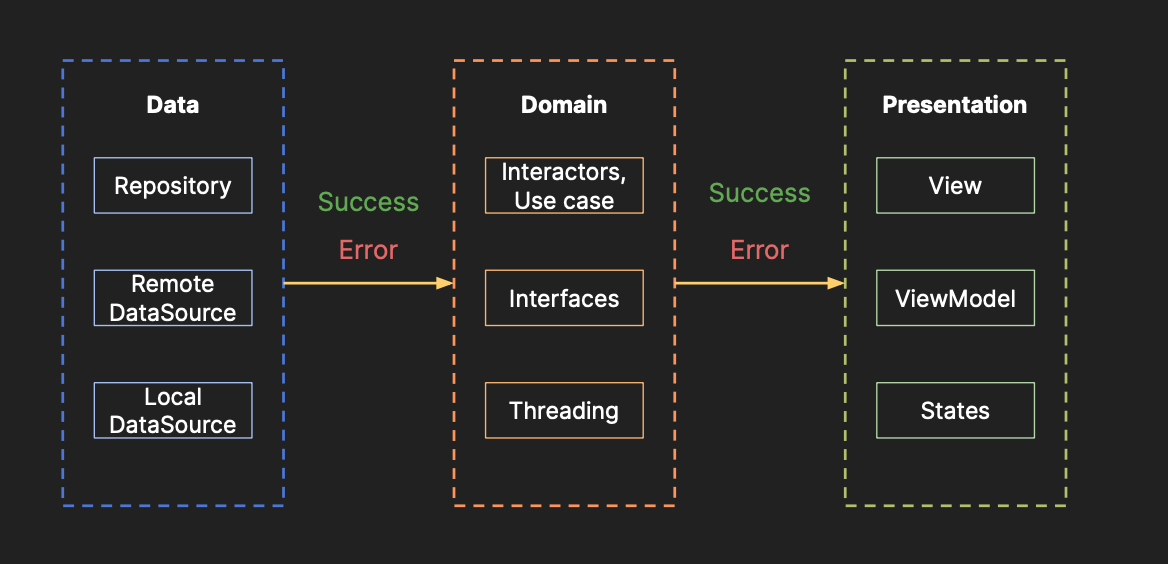
But that apparent simplicity hides a serious problem. This compiles and runs. But once you trace the data flow through a full architecture, where the data source feeds a repository that feeds a ViewModel that drives the UI, the problems become clear.
The problems with conventional response handling
The code above has three major issues that compound as your project grows and the number of API endpoints increases.
Ambiguous results
The data source returns emptyList() for both HTTP errors and network exceptions. Downstream layers (the repository, the ViewModel) receive a List<Poster> with no way to distinguish between three completely different scenarios:
- The request succeeded and the server returned an empty list.
- The request failed with a 401 Unauthorized error.
- The device had no network connectivity.
All three produce the same result: an empty list. The repository cannot decide whether to show an error message, redirect to a login screen, or display "no data" content. The ViewModel might show an empty state when it should be showing a "please log in" dialog. The response has lost its context, and once that context is gone, no amount of downstream logic can recover it.
You might try to work around this by returning null for failures instead of emptyList(). But that introduces its own ambiguity: does null mean "error" or "no data"? You end up needing a wrapper type anyway, which leads to the next problem. That's just adding one more implicit convention on your head.
Boilerplate error handling
Every API call requires its own try-catch block. If you have 20 service methods, you write 20 nearly identical try-catch blocks. Each one catches HttpException, catches Throwable, and returns some fallback value. This repetition creates maintenance overhead and increases the surface area for mistakes, like forgetting to handle a specific exception type in one of the 20 call sites.
Consider a data source with multiple methods:
class UserRemoteDataSource(private val userService: UserService) {

  suspend fun fetchUser(id: String): User? {
    return try {
      userService.fetchUser(id)
    } catch (e: HttpException) { null }
      catch (e: Throwable) { null }
  }

  suspend fun fetchFollowers(id: String): List<User> {
    return try {
      userService.fetchFollowers(id)
    } catch (e: HttpException) { emptyList() }
      catch (e: Throwable) { emptyList() }
  }

  suspend fun updateProfile(profile: Profile): Boolean {
    return try {
      userService.updateProfile(profile)
      true
    } catch (e: HttpException) { false }
      catch (e: Throwable) { false }
  }
}
The pattern is identical every time: try the call, catch HttpException, catch Throwable, return a fallback. The only thing that changes is the fallback value (null, emptyList(), false). This is textbook boilerplate that should not exist in every data source class.
One dimensional response processing
The repository and presentation layers receive only the raw data type (List<Poster>, User?, Boolean). They have no access to HTTP status codes, error bodies, or exception details. If the ViewModel needs to show a specific error message based on the HTTP status code, for example "Your session has expired" for 401 or "Server is undergoing maintenance" for 503, the data source must somehow encode that information into the return type.
You either propagate exceptions upward (which defeats the purpose of catching them), create custom sealed classes for every API call (which creates even more boilerplate), or lose the information entirely.
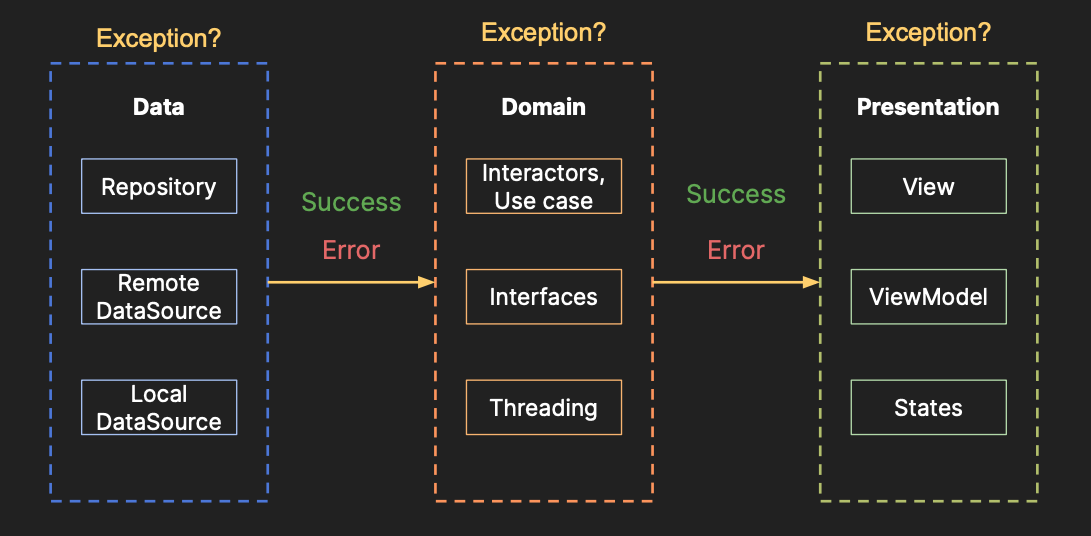
What you actually need is a single type that encapsulates the full outcome of an API call, success data, error details, or exception information, and that can flow through every layer without losing any context along the way. That is exactly what Sandwich provides.
Hello Sandwich
Sandwich is a Kotlin Multiplatform library that constructs standardized response types for API and I/O calls using sealed types. It provides a lightweight
ApiResponse type that models success, error, and exception cases as distinct subtypes, along with a rich set of composable extension functions for handling, transforming, recovering, validating, filtering, and combining responses cleanly across your architecture.
Sandwich works with Retrofit,
Ktor, and
Ktorfit. It does not require annotation processing, code generation, or custom Gradle plugins. The integration is a single line of configuration.
Setup
Add the dependency to your module's build.gradle.kts:
dependencies {
  // Choose the module that matches your HTTP client:
  implementation("com.github.skydoves:sandwich-retrofit:$version") // for Retrofit
  implementation("com.github.skydoves:sandwich-ktor:$version")     // for Ktor
  implementation("com.github.skydoves:sandwich-ktorfit:$version")  // for Ktorfit
}
For Retrofit, add the ApiResponseCallAdapterFactory to your Retrofit builder:
val retrofit = Retrofit.Builder()
  .baseUrl(BASE_URL)
  .addCallAdapterFactory(ApiResponseCallAdapterFactory.create())
  .addConverterFactory(MoshiConverterFactory.create())
  .build()
The ApiResponseCallAdapterFactory intercepts every Retrofit call and wraps the result into an ApiResponse. It handles successful responses, HTTP errors, and network exceptions automatically. You do not need to add any try-catch blocks or custom interceptors.
Then change your service return type to ApiResponse<T>:
interface PosterService {

  @GET("DisneyPosters.json")
  suspend fun fetchPosterList(): ApiResponse<List<Poster>>
}
That is the entire setup. Your service method now returns ApiResponse<List<Poster>> instead of List<Poster>. Every possible outcome, success, HTTP error, network exception, is captured in this single return type.
For Ktor, you can use the apiResponseOf extension function that wraps any Ktor HttpResponse:
val apiResponse = apiResponseOf<List<Poster>> {
  client.get("DisneyPosters.json")
}
For Ktorfit, add the ApiResponseConverterFactory:
val ktorfit = Ktorfit.Builder()
  .baseUrl(BASE_URL)
  .converterFactories(ApiResponseConverterFactory.create())
  .build()
All three integrations produce the same ApiResponse<T> type, so the rest of your architecture (repository, ViewModel, UI) works identically regardless of which HTTP client you use.
ApiResponse
ApiResponse is a sealed interface with three subtypes that model every possible outcome of an API call. Understanding the distinction between these three types is fundamental to using Sandwich effectively.
Basically, ApiResponse consists of the following three subclasses: ApiResponse.Success, ApiResponse.Failure.Error, and ApiResponse.Failure.Exception:
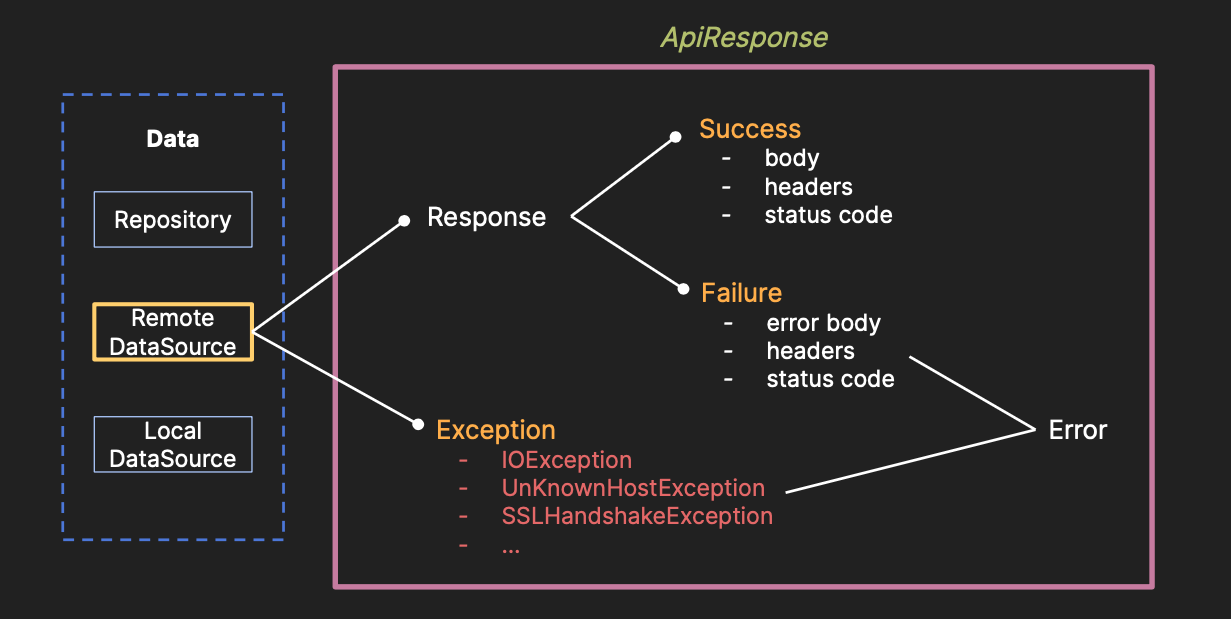
ApiResponse.Success
Represents a successful response where the server returned a 2xx status code and the response body was deserialized without errors. This is the happy path. The data property contains the deserialized response body:
val apiResponse = ApiResponse.Success(data = posterList)
val data: List<Poster> = apiResponse.data
For Retrofit integration, ApiResponse.Success also carries the original response metadata, which you can access through platform specific extensions:
val statusCode: StatusCode = apiResponse.statusCode
val headers: Headers = apiResponse.headers
This is useful when you need to read pagination headers, cache control directives, or rate limit information from a successful response.
ApiResponse.Failure.Error
Represents an HTTP error response, where the server received the request and responded, but with a non 2xx status code. This includes 400 Bad Request, 401 Unauthorized, 403 Forbidden, 404 Not Found, 500 Internal Server Error, and every other HTTP error code. The error payload (the response body) is available for parsing:
val apiResponse = ApiResponse.Failure.Error(payload = errorBody)
val payload = apiResponse.payload
With Retrofit, the payload contains the original okhttp3.Response, so you can read the error body, status code, and headers. With Ktor, the payload contains the HttpResponse. In both cases, the full error context is preserved.
ApiResponse.Failure.Exception
Represents a client side exception that occurred before receiving any HTTP response from the server. This is fundamentally different from Failure.Error. An Error means the network request completed and the server sent back an error response. An Exception means the request never completed at all. Common causes include:
- Network connectivity failures (airplane mode, no Wi-Fi).
- DNS resolution errors (server hostname cannot be resolved).
- Connection timeouts (server did not respond in time).
- SSL/TLS handshake failures (certificate issues).
- JSON parsing errors (response body could not be deserialized).
val apiResponse = ApiResponse.Failure.Exception(throwable = exception)
val throwable: Throwable = apiResponse.throwable
val message: String? = apiResponse.message

This distinction matters for your UI. When the server returns a 401 Unauthorized (Failure.Error), you might show "Please log in again." When the device has no network (Failure.Exception), you might show "Check your internet connection." Without this distinction, you cannot give your users the right guidance.
Handling ApiResponse
Now that ApiResponse captures every outcome, you need a clean way to handle each case. Sandwich provides chainable extension functions that execute scoped lambdas based on the response type:
val response = posterService.fetchPosterList()
response.onSuccess {
  // this: ApiResponse.Success<List<Poster>>
  // access `data` directly
  val posters: List<Poster> = data
}.onError {
  // this: ApiResponse.Failure.Error
  // access `payload`, `message()`, `statusCode`, etc.
  val message = message()
}.onException {
  // this: ApiResponse.Failure.Exception
  // access `throwable`, `message`, etc.
  val cause = throwable
}
Each lambda only executes when the response matches its type. The onSuccess block runs only on success, onError only on HTTP errors, and onException only on client side exceptions. The key design here is that each extension returns the original ApiResponse, so all three handlers can be chained in a single expression. Only the matching handler executes; the others are skipped silently.
Inside each lambda, this is set to the corresponding ApiResponse subtype. Inside onSuccess, you can access data and tag directly. Inside onError, you can access payload and call message(). Inside onException, you can access throwable and message. There is no manual casting required.
If you do not need to distinguish between error and exception, you can use onFailure to handle both failure types in a single block:
response.onSuccess {
  _posters.value = data
}.onFailure {
  // this: ApiResponse.Failure
  // handles both Error and Exception
  _error.value = message()
}
This is convenient when your UI shows the same error state regardless of whether the failure was a server error or a network exception.
Exhaustive handling with when
You can also use Kotlin's when expression for exhaustive matching:
when (response) {
  is ApiResponse.Success -> {
    val posters = response.data
  }
  is ApiResponse.Failure.Error -> {
    val message = response.message()
  }
  is ApiResponse.Failure.Exception -> {
    val throwable = response.throwable
  }
}
Because ApiResponse is a sealed interface, the compiler verifies that all cases are handled. If a new subtype were ever added, every when expression without an else branch would produce a compile time error until updated. This gives you compile time safety that your error handling is complete.
Multi layered architecture with ApiResponse
With ApiResponse, your entire architecture changes. The data source becomes trivial because it no longer needs try-catch blocks, fallback values, or any error handling at all:
class PosterRemoteDataSource(
  private val posterService: PosterService,
) {
  suspend fun fetchPosterList(): ApiResponse<List<Poster>> {
    return posterService.fetchPosterList()
  }
}
Compare this with the original version that had nested try-catch blocks returning emptyList(). The data source is now a straightforward pass through. All error context is preserved in the ApiResponse.
The repository can apply business logic while keeping the ApiResponse wrapper intact. For example, it might cache successful results or enrich the response with local data:
class PosterRepository(
  private val remoteDataSource: PosterRemoteDataSource,
  private val posterDao: PosterDao,
) {
  suspend fun fetchPosterList(): ApiResponse<List<Poster>> {
    val response = remoteDataSource.fetchPosterList()
    response.onSuccess {
      posterDao.insertPosterList(data) // cache successful results
    }
    return response
  }
}
The ViewModel handles each case with full context, making the right UI decision for each scenario:
class PosterViewModel(
  private val repository: PosterRepository,
) : ViewModel() {

  fun fetchPosters() {
    viewModelScope.launch {
      val response = repository.fetchPosterList()
      response.onSuccess {
        _posters.value = data
      }.onError {
        // Server responded with an error; show appropriate message
        _error.value = message()
      }.onException {
        // Network or client error; suggest checking connectivity
        _error.value = "Please check your internet connection."
      }
    }
  }
}
The response carries its full context through every layer. The ViewModel can distinguish between empty data (a successful response with an empty list), server errors (401, 500, etc.), and network failures (no connectivity, timeout) without the data source losing any information along the way. Each layer adds its own logic without stripping away the information that other layers need.
Retrieving data directly
Sometimes you do not need the full chained handling and just want to extract the data from a response. Sandwich provides three extraction functions for this:
// Returns the data if successful, null otherwise
val posters: List<Poster>? = response.getOrNull()

// Returns the data if successful, or a default value
val posters: List<Poster> = response.getOrElse(emptyList())

// Returns the data if successful, or throws an exception
val posters: List<Poster> = response.getOrThrow()
getOrNull() is useful in contexts where you just need the data and can handle null downstream, such as inside a let block or when combining with other nullable operations. getOrElse() is ideal when you have a sensible default value, like an empty list for a collection endpoint.
getOrThrow() is for cases where you want to propagate the failure as an exception, which can be useful at the boundary between Sandwich code and legacy code that expects exceptions.
You can also use getOrElse with a lambda for lazy default evaluation:
val posters: List<Poster> = response.getOrElse {
  posterDao.getCachedPosters() // only called on failure
}
ApiResponse with Coroutines and Flow
For reactive architectures that use Kotlin Flow, Sandwich provides suspend extensions that allow you to call suspend functions inside the handler scopes. This is essential because standard onSuccess, onError, and onException accept non suspend lambdas, which means you cannot call database operations, additional network requests, or other suspend functions inside them.
The suspend variants, suspendOnSuccess, suspendOnError, and suspendOnException, solve this:
fun fetchPosterList() = flow {
  val response = posterService.fetchPosterList()
  response.suspendOnSuccess {
    posterDao.insertPosterList(data) // suspend function: save to database
    emit(data)                       // suspend function: emit to flow
  }.suspendOnError {
    val cached = posterDao.getCachedPosterList() // suspend function: fallback to cache
    emit(cached)
  }.suspendOnException {
    emit(emptyList())
  }
}.flowOn(Dispatchers.IO)
This pattern is useful because each handler scope is a suspend lambda. You can perform database insertions, additional API calls, file I/O, or any other suspend work directly inside the handler without nesting coroutine builders. The Flow collects the emitted data and propagates it downstream to the UI layer.
Converting to Flow directly
If you only need the success data as a Flow and want to handle failures separately, Sandwich provides the toFlow() extension:
val flow: Flow<List<Poster>> = posterService.fetchPosterList()
  .onError {
    logger.error("API error: ${message()}")
  }.onException {
    logger.error("Network error: $message")
  }.toFlow()
The toFlow() extension creates a Flow that emits the success data. If the response is a failure, the Flow emits nothing (it returns emptyFlow()). This is useful when you handle failures through side effects (logging, showing a toast) and only want the success data to flow into your state.
You can also transform the data during the conversion. This is a common pattern in repository layers where you want to cache the API response and then return data from the local database:
val flow = posterService.fetchPosterList()
  .toFlow { posters ->
    posters.forEach { it.page = page }
    posterDao.insertPosterList(posters)
    posterDao.getAllPosterList(page) // return cached data instead
  }.flowOn(Dispatchers.IO)
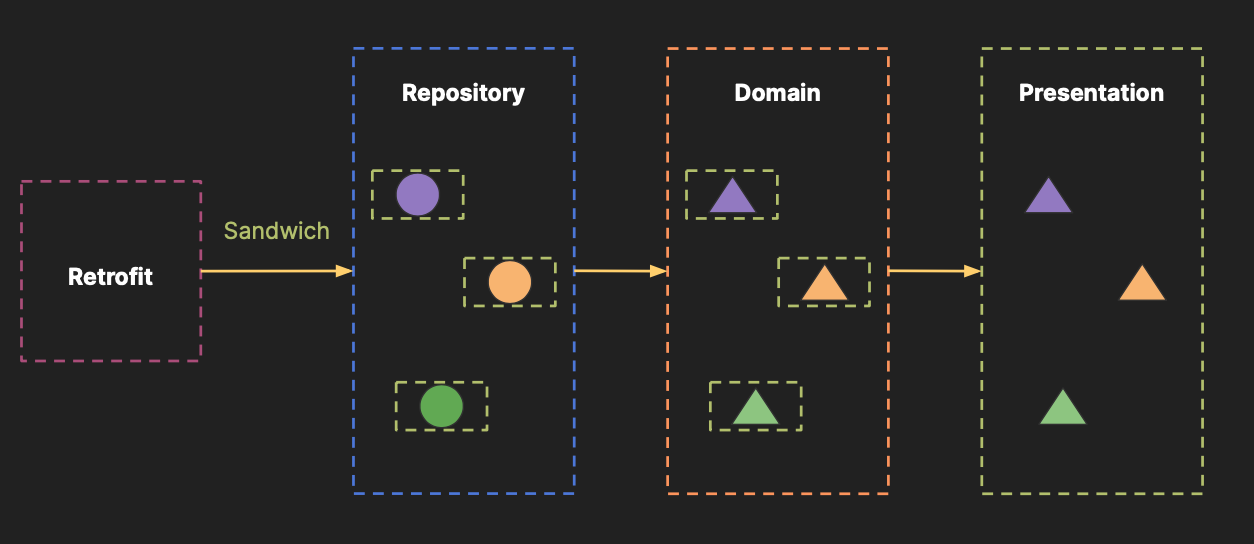
The lambda receives the success data and returns the transformed result. The database operations run inside the Flow's coroutine context, so everything is suspend safe. With this approach, now you can have a very unified response type across all different multi layers as like the image below:
Mapping and transforming responses
Real world APIs rarely return data in the exact shape your UI needs. The server might return a UserAuthResponse with tokens and metadata, but your ViewModel only needs a LoginInfo with the user object and token string. Sandwich provides mapping extensions that transform the data inside an ApiResponse without breaking the response chain or losing failure context.
mapSuccess
Transforms the success data from type T to type V. If the response is a failure, mapSuccess passes it through unchanged:
val response: ApiResponse<LoginInfo> = authService.requestToken(
  UserRequest(authProvider = provider, authIdentifier = id, email = email),
).mapSuccess {
  // `this` is UserAuthResponse
  LoginInfo(user = user, token = token)
}
This is particularly useful in repository layers where you want to convert API models into domain models. The repository exposes ApiResponse<LoginInfo> to the ViewModel, while the service returns ApiResponse<UserAuthResponse>. The mapping happens in one place, and failure responses pass through untouched.
Another common use case is extracting a single item from a list response:
val response: ApiResponse<Poster?> = posterService.fetchPosterList()
  .mapSuccess { firstOrNull() }
mapFailure
Transforms the failure payload. This is useful when you want to normalize error bodies across different endpoints:
val response = apiResponse.mapFailure { responseBody ->
  "error body: ${responseBody?.string()}".toResponseBody()
}
flatMap
Transforms an ApiResponse into a completely different ApiResponse. Unlike mapSuccess which only transforms the success data, flatMap gives you access to the entire response and lets you return any ApiResponse type. This is powerful for mapping server error bodies into custom error types:
val response = service.fetchMovieList()
  .flatMap {
    if (this is ApiResponse.Failure.Error) {
      val errorBody = (payload as? Response)?.body?.string()
      if (errorBody != null) {
        val error: ErrorMessage = Json.decodeFromString(errorBody)
        when (error.code) {
          10000 -> LimitedRequest
          10001 -> WrongArgument
          else -> this
        }
      } else this
    } else this
  }
After this flatMap, the response is either the original ApiResponse.Success (untouched) or one of your custom error types (LimitedRequest, WrongArgument). Downstream layers can pattern match on these custom types without parsing error bodies again.
Sequential dependent requests
Many real world workflows require chaining multiple API calls where each call depends on the result of the previous one. For example: first fetch an authentication token, then use that token to fetch user details, then use the user's name to query their posters. If any step fails, the entire chain should fail with that step's error.
Sandwich provides the then and suspendThen infix functions for this exact pattern:
val response = service.getUserToken(userId) suspendThen { tokenResponse ->
  service.getUserDetails(tokenResponse.token)
} suspendThen { userResponse ->
  service.queryPosters(userResponse.user.name)
}

response.onSuccess {
  _posters.value = data
}.onFailure {
  _error.value = message()
}
If getUserToken fails, getUserDetails and queryPosters are never called. The failure from the first call propagates directly to the final onFailure handler. If getUserToken succeeds but getUserDetails fails, queryPosters is skipped and the error from getUserDetails propagates. This eliminates deeply nested callbacks or chained if checks.

You can also combine suspendThen with mapSuccess to transform the final result:
service.getUserToken(userId) suspendThen { tokenResponse ->
  service.getUserDetails(tokenResponse.token)
} suspendThen { userResponse ->
  service.queryPosters(userResponse.user.name)
}.mapSuccess { posterResponse ->
  posterResponse.posters
}.onSuccess {
  posterStateFlow.value = data
}.onFailure {
  Log.e("API", message())
}
Recovery and fallbacks
Network requests fail. Servers go down, devices lose connectivity, and APIs return unexpected errors. Sandwich provides recovery extensions that let you define fallback behavior when a request fails, without losing the composability of the response chain.
recover
Returns an ApiResponse.Success with a fallback value if the response is a failure. If the response is already successful, it passes through unchanged:
val response = posterService.fetchPosterList()
  .recover(emptyList())
This is similar to returning emptyList() in a catch block, but with an important difference: the recovery happens after all the response context has been captured. You can chain recover with other extensions:
val response = posterService.fetchPosterList()
  .peekError { logger.error("API error: ${message()}") }
  .peekException { crashReporter.record(throwable) }
  .recover(emptyList())
Here, the error is logged and reported before the recovery produces a fallback value. The logging and crash reporting still see the original failure. With a try-catch approach, you would need to catch the exception, log it, and then return the fallback, all in the same block.
For lazy evaluation, use the lambda variant:
val response = posterService.fetchPosterList()
  .recover { posterDao.getCachedPosterList() }
The lambda is only called when the response is a failure, so the database query does not run on successful requests.
recoverWith
Recovers a failure by executing an alternative operation that itself returns an ApiResponse. This is useful when your fallback is another API call or a database query that might also fail:
val response = primaryService.fetchPosterList()
  .recoverWith { failure ->
    // Try a backup service; this also returns ApiResponse
    backupService.fetchPosterList()
  }
If the primary service fails, the backup service is called. If the backup also fails, that failure is the final result. For suspend fallbacks, use suspendRecoverWith:
val response = primaryService.fetchPosterList()
  .suspendRecoverWith { failure ->
    backupService.fetchPosterList() // suspend function
  }
Validation
Sometimes a successful API response contains data that does not meet your application's requirements. The server returned a 200 OK, but the data itself is invalid, empty, or missing required fields. Sandwich provides validation extensions that convert a success response into a failure when the data does not pass your criteria.
validate
Validates the success data with a predicate. If the predicate returns false, the response is converted to ApiResponse.Failure.Error with your specified error message:
val response = posterService.fetchPosterList()
  .validate(
    predicate = { it.isNotEmpty() },
    errorMessage = { "Poster list cannot be empty" },
  )
Now downstream handlers will see a Failure.Error if the list is empty, even though the HTTP request technically succeeded. This is useful for APIs that return empty arrays instead of proper error codes when something goes wrong on the server side.
requireNotNull
Requires a specific field within the success data to be non null. If the selected value is null, the response is converted to a failure:
val response = userService.fetchUser()
  .requireNotNull(
    selector = { it.profileImage },
    errorMessage = { "Profile image is required" },
  )
This transforms the ApiResponse<User> into an ApiResponse<String> (the profile image URL), validating non null in the same step. It combines extraction and validation into a single operation.
For suspend validation logic (e.g., checking against a database or calling a validation service), use the suspend variants:
val response = userService.fetchUser()
  .suspendValidate { user ->
    userValidator.isValid(user) // suspend function
  }
Filtering list responses
For API responses that return lists, Sandwich provides filtering extensions that remove items from the success data based on a predicate:
val response = posterService.fetchPosterList()
  .filter { poster -> poster.isActive }
This returns an ApiResponse<List<Poster>> containing only active posters. On failure responses, the filter has no effect; the failure passes through unchanged.
The inverse is also available:
val response = posterService.fetchPosterList()
  .filterNot { poster -> poster.isDeprecated }
These are especially useful when the server does not support filtering queries and you need to filter on the client side. You can chain filters with other extensions for a complete pipeline:
val response = posterService.fetchPosterList()
  .validate(predicate = { it.isNotEmpty() }) { "No posters found" }
  .filter { it.isActive }
  .mapSuccess { sortedByDescending { it.createdAt } }
  .recover(emptyList())
This validates the list is not empty, filters to active items, sorts by creation date, and falls back to an empty list if anything fails. Each step composes cleanly because they all operate on ApiResponse<List<Poster>>.
Combining multiple responses
Many screens need data from multiple API endpoints. A home screen might need user profile data and a list of recommended posters. A dashboard might need settings, notifications, and activity data. Sandwich provides zip extensions that combine multiple ApiResponse instances into a single response.
zip
Combines two ApiResponse instances. If both are successful, the transform function runs. If either is a failure, the first failure is returned:
val usersResponse = userService.fetchUsers()
val postersResponse = posterService.fetchPosters()

val combined = usersResponse.zip(postersResponse) { users, posters ->
  HomeScreenData(users = users, posters = posters)
}

combined.onSuccess {
  _homeData.value = data
}.onFailure {
  _error.value = message()
}
This is cleaner than nesting two onSuccess handlers or using async/await with manual error checking. If the users call succeeds but the posters call fails, you get the posters failure as the combined result. No partial data, no inconsistent state.
For a simple pair without transformation:
val paired = usersResponse.zip(postersResponse)
// Returns ApiResponse<Pair<List<User>, List<Poster>>>
Merging paginated responses
When you need to fetch multiple pages of the same endpoint and combine the results into a single response, Sandwich provides the merge extension:
val response = posterService.fetchPosterList(page = 0).merge(
  posterService.fetchPosterList(page = 1),
  posterService.fetchPosterList(page = 2),
  mergePolicy = ApiResponseMergePolicy.PREFERRED_FAILURE,
)

response.onSuccess {
  // `data` contains the combined list from all three pages
  _posters.value = data
}.onError {
  // at least one page returned an error
  _error.value = message()
}
The mergePolicy parameter controls how failures are handled. PREFERRED_FAILURE returns a failure if any page fails. IGNORE_FAILURE collects the successful pages and ignores failures, which is useful when you want partial results.
Observing responses with peek
Peek extensions let you observe a response for side effects without modifying it. This is the right tool for logging, analytics, caching, and crash reporting, operations that should happen as a side effect of the response but should not change the response itself:
val response = posterService.fetchPosterList()
  .peekSuccess { posters ->
    analytics.trackPostersLoaded(posters.size)
    logger.info("Loaded ${posters.size} posters")
  }
  .peekError { error ->
    errorTracker.trackApiError(error.statusCode)
    logger.warn("API error: ${error.message()}")
  }
  .peekException { exception ->
    crashReporter.recordException(exception.throwable)
    logger.error("Network exception: ${exception.message}")
  }
Each peek extension returns the original ApiResponse unchanged. You can chain peek calls before or after any other extension. This is useful for building an observation pipeline that runs independently of your handling logic:
val response = posterService.fetchPosterList()
  .peekSuccess { analytics.trackSuccess() }
  .peekFailure { analytics.trackFailure() }
  .recover(emptyList()) // peek ran before recovery, so it sees the original failure
There is also a generic peek that runs on any response type:
val response = posterService.fetchPosterList()
  .peek { logger.info("Response received: $it") }
For suspend side effects (like writing to a cache or database), use the suspend variants: suspendPeekSuccess, suspendPeekError, suspendPeekException, suspendPeekFailure, and suspendPeek.
Custom error types
Real world APIs return structured error bodies with error codes and messages. You want your Kotlin code to handle these as typed objects, not raw strings or JSON. Sandwich lets you define custom error and exception types by extending ApiResponse.Failure.Error or ApiResponse.Failure.Exception:
data object LimitedRequest : ApiResponse.Failure.Error(
  payload = "your request is limited",
)

data object WrongArgument : ApiResponse.Failure.Error(
  payload = "wrong argument",
)

data object UnKnownError : ApiResponse.Failure.Exception(
  throwable = RuntimeException("unknown error"),
)

data object HttpException : ApiResponse.Failure.Exception(
  throwable = RuntimeException("http exception"),
)
These custom types work with ApiResponse<T> for any T, because Failure.Error and Failure.Exception extend Failure<Nothing>, which is compatible with any generic parameter through Kotlin's covariance.
In downstream layers, you can pattern match on your custom types directly:
response.onError {
  when (this) {
    LimitedRequest -> showRateLimitDialog()
    WrongArgument -> showValidationError()
    else -> showGenericError()
  }
}.onException {
  when (this) {
    HttpException -> showHttpErrorUI()
    UnKnownError -> showGenericErrorUI()
    else -> showNetworkError()
  }
}
Global failure mappers
Defining custom error types is useful, but you still need to parse the error body and create the right custom type. Doing this with flatMap on every API call brings back the boilerplate problem. Sandwich solves this with global failure mappers that you register once during application initialization:
// In your Application.onCreate() or DI module
SandwichInitializer.sandwichFailureMappers += ApiResponseFailureMapper { failure ->
  if (failure is ApiResponse.Failure.Error) {
    val errorBody = (failure.payload as? Response)?.body?.string()
    if (errorBody != null) {
      val error: ErrorMessage = Json.decodeFromString(errorBody)
      return@ApiResponseFailureMapper when (error.code) {
        10000 -> LimitedRequest
        10001 -> WrongArgument
        10002 -> HttpException
        else -> UnKnownError
      }
    }
  }
  failure
}
Once registered, this mapper transforms every ApiResponse.Failure across your entire application automatically. Every API call, whether it is posterService.fetchPosterList(), userService.fetchUser(), or authService.login(), goes through the mapper. Your ViewModels and repositories only need to handle the custom types:
val response = service.fetchMovieList()
response.onSuccess {
  _movies.value = data
}.onException {
  when (this) {
    LimitedRequest -> showRateLimitUI()
    WrongArgument -> showValidationUI()
    HttpException -> showHttpErrorUI()
    UnKnownError -> showGenericErrorUI()
    else -> showDefaultErrorUI()
  }
}
For Ktor or Ktorfit where reading the error body requires a suspend function (like HttpResponse.bodyAsText()), use ApiResponseFailureSuspendMapper:
SandwichInitializer.sandwichFailureMappers += object : ApiResponseFailureSuspendMapper {
  override suspend fun map(apiResponse: ApiResponse.Failure<*>): ApiResponse.Failure<*> {
    if (apiResponse is ApiResponse.Failure.Error) {
      val errorBody = (apiResponse.payload as? HttpResponse)?.bodyAsText()
      if (errorBody != null) {
        val error: ErrorMessage = Json.decodeFromString(errorBody)
        return when (error.code) {
          10000 -> LimitedRequest
          10001 -> WrongArgument
          else -> UnKnownError
        }
      }
    }
    return apiResponse
  }
}
The suspend mapper is properly awaited in suspend contexts, ensuring the mapped response is returned correctly to callers. You can register both synchronous and suspend mappers in the same list, and they will be applied in order.
Global operators
While failure mappers transform failure responses, global operators observe every response (including successes) for cross cutting concerns. This is the right tool for centralized logging, analytics, authentication token refresh, or showing global error indicators:
SandwichInitializer.sandwichOperators += object : ApiResponseOperator<Any>() {

  override fun onSuccess(apiResponse: ApiResponse.Success<Any>) {
    logger.info("API success: ${apiResponse.data}")
  }

  override fun onError(apiResponse: ApiResponse.Failure.Error) {
    logger.error("API error: ${apiResponse.message()}")
    if (apiResponse.statusCode == StatusCode.Unauthorized) {
      // Trigger a global logout or token refresh
      authManager.onUnauthorized()
    }
  }

  override fun onException(apiResponse: ApiResponse.Failure.Exception) {
    logger.error("API exception: ${apiResponse.message}")
    crashReporter.recordException(apiResponse.throwable)
  }
}
This operator runs on every ApiResponse created through ApiResponse.of or ApiResponse.suspendOf (which includes all Retrofit, Ktor, and Ktorfit responses). The 401 handling in the example above applies globally: any API call that returns a 401 triggers the auth manager, without requiring each call site to check for it.
For suspend operators, use ApiResponseSuspendOperator which properly awaits in suspend contexts:
SandwichInitializer.sandwichOperators += object : ApiResponseSuspendOperator<Any>() {

  override suspend fun onSuccess(apiResponse: ApiResponse.Success<Any>) {
    analyticsService.trackSuccess() // suspend function
  }

  override suspend fun onError(apiResponse: ApiResponse.Failure.Error) {
    analyticsService.trackError(apiResponse.message()) // suspend function
  }

  override suspend fun onException(apiResponse: ApiResponse.Failure.Exception) {
    analyticsService.trackException(apiResponse.throwable) // suspend function
  }
}
Conclusion
Conventional API response handling with try-catch blocks leads to ambiguous results, repetitive boilerplate, and lost context as data flows through layered architectures. Each layer that catches and re-wraps exceptions strips away the information that downstream layers need to make informed UI decisions. A ViewModel that receives emptyList() cannot tell whether the server returned no data, the user's token expired, or the device lost network connectivity.
Sandwich solves this by introducing
ApiResponse, a sealed type that captures success data, HTTP error details, and exception information in a single value that flows transparently through every layer. The ApiResponseCallAdapterFactory integrates with Retrofit in one line, the apiResponseOf extension works with Ktor, and the ApiResponseConverterFactory bridges Ktorfit. Beyond basic handling, the full extension API, chained handlers, mapping, sequential composition, recovery, validation, filtering, zipping, merging, peeking, and global interception, composes cleanly to address the real world patterns that every production application encounters.
If you want to explore Sandwich further, check out the official documentation, the
GitHub repository, and the real world sample projects like
Pokedex that demonstrate Sandwich.
As always, happy coding!
— Jaewoong